Preface
All example code has been uploaded to a Git repository. Feel free to clone it directly if needed: https://github.com/rainuxhe/mcp-examples
Introduction
MCP (Model Context Protocol) is a standardized protocol designed for managing context in large language model interactions. Its core objective is to establish a structured, controllable, and extensible semantic execution environment for models, enabling them to perform task scheduling, tool invocation, resource collaboration, and state persistence within a unified context management framework. This approach overcomes the limitations of traditional Prompt Engineering in multi-turn interactions, instruction composition, and behavioral stability.
In conventional large language model applications, models can only passively receive inputs and generate outputs. To enable external tool calls or access custom context, developers must manually implement API calls, authentication, and error handling logic—making the code both cumbersome and difficult to maintain. MCP was created to abstract these “context management” and “tool invocation” capabilities into a standardized communication protocol, allowing developers to focus on “what resources I want to use” while dedicated MCP servers handle the actual execution, state management, and result return.
Official MCP GitHub: https://github.com/modelcontextprotocol/servers
Some argue that traditional large language model development is called “Prompt Engineering,” whereas with MCP, it should be termed “Context Engineering.” Traditional prompt engineering often relies on simple string concatenation, which presents several challenges:
- Ambiguity: Models may struggle to distinguish between instructions, user input, and retrieved data.
- Prompt Injection Risk: Malicious instructions in prompts (e.g.,
ignore all previous instructions) can deceive the model. - Fragility: Minor formatting changes (such as an extra newline character) can significantly degrade model performance.
- Maintainability Issues: As context complexity increases (e.g., multiple data sources, tool definitions, message history), this concatenation approach becomes unwieldy and chaotic (based on personal experience—after stuffing numerous historical messages, the model’s responses drifted further from the intended direction).
Core Concepts
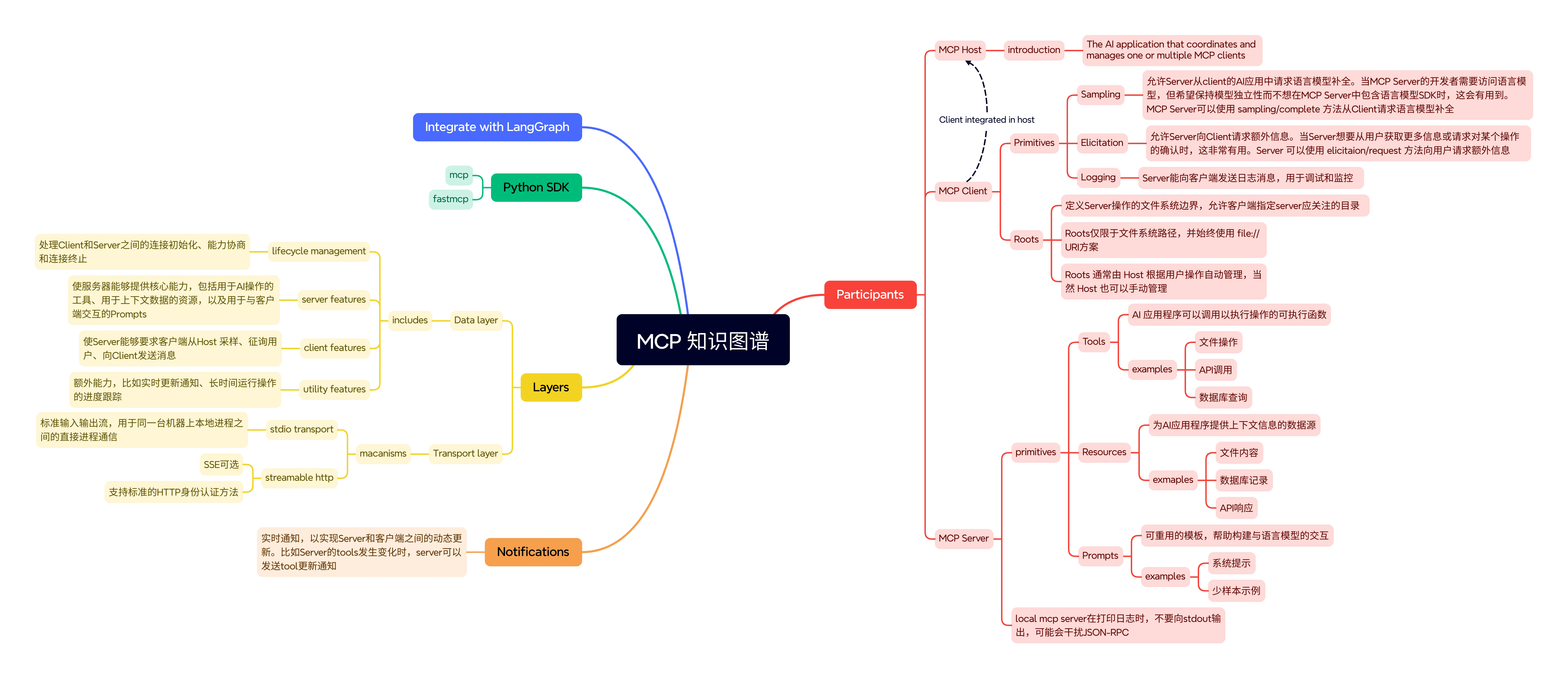
Tools
Tools are functions that AI models can invoke to perform specific operations. They enable models to interact with external systems and execute state-changing actions, such as:
- Calling APIs to retrieve real-time data
- Querying or modifying databases
- Executing code or scripts
- Sending emails or messages
- File operations
Tools are controlled by the model, meaning the AI decides whether and when to use them. Tool invocations may produce side effects, and their results can be fed back into the conversation.
Resources
Resources are read-only context units (data sources) provided to the model. They can include:
- File contents
- Database records
- API responses
- Knowledge base content
Resources are controlled by the application, where the host or developer determines which data to expose and how to expose it. Reading resources has no side effects, similar to a GET request that only retrieves data. Resources provide content that can be injected into the model’s context when needed (e.g., retrieved documents in a question-answering scenario).
Prompts
Prompts are reusable templates or instructions that can be invoked as needed. They are either user-controlled or pre-defined by developers. Prompts may contain templates for common tasks or guided workflows (e.g., code review templates or Q&A formats).
Key characteristics of prompt templates include:
- Parameterization: Support for dynamic parameter input
- Resource Integration: Ability to embed resource context for model reference
- Multi-turn Interaction: Support for building multi-turn dialogue flows
- Unified Discovery: Registration and invocation through standard interfaces
Sampling
Sampling is the mechanism by which tools interact with LLMs to generate text. Through sampling, tools can request the LLM to produce textual content, such as poetry, articles, or other text formats. This allows tools to leverage the LLM’s capabilities for content creation beyond executing predefined operations.
Elicitation
Elicitation is a mechanism that allows tools to request additional information or confirmation from users. When a tool requires more information to proceed during execution, it can use elicitation to interact with the user. This is particularly useful for operations requiring user confirmation or additional parameters.
For example, in a booking system, if the requested date is fully booked, the tool can elicit whether the user would prefer alternative dates. The elicitation mechanism ensures that tools can pause execution when necessary and wait for user input, thereby providing a better user experience.
Key characteristics of elicitation include:
- Interactivity: Enables bidirectional communication between tools and users
- Validation: Allows validation of user input to ensure data correctness
- Optionality: Users can accept, reject, or cancel elicitation requests
- Structured Input: Supports structured data input for handling complex information
Roots
Roots represent the starting point of a semantic execution, carrying information such as resource references, execution objectives, and response formats, supporting multiple concurrent execution streams. As the foundational input structure for semantic execution, roots can contain multiple prompts and tools, providing models with a complete contextual environment.
Logging
Logging is a crucial feature in MCP that allows servers and tools to send log information to clients. Through logging, developers can track tool execution processes, debug issues, and monitor system status. MCP supports multiple log levels, including debug, info, warning, and error.
Notifications
The notification mechanism allows servers to send real-time updates to clients, such as resource changes or tool list updates. Through notifications, clients can promptly respond to server state changes and update user interfaces or perform other operations accordingly. Common notification types include resource update notifications, tool list change notifications, and prompt list change notifications.
Components
MCP Server
An MCP Server is an independent program or service that exposes specific functionality, tools, or data resources to MCP clients through the MCP protocol.
Responsibilities:
- Providing Tools/Resources: The MCP Server acts as a wrapper or adapter for external capabilities (such as databases, APIs, file systems, or computational services). It exposes these external capabilities in a standardized format that large language models can invoke.
- Executing Operations: When receiving requests from MCP Clients, the MCP Server is responsible for executing underlying operations (e.g., querying databases, calling third-party APIs, executing code).
- Returning Results: Delivering execution results back to the requesting MCP Client.
- Independent Deployment: MCP Servers can run on local machines or be deployed on remote servers.
MCP Host
The Host is the application or environment with which users directly interact. It typically serves as the entry point for AI applications, such as:
- A chatbot interface
- An IDE
- A custom AI agent application
Responsibilities:
- User Interaction: Receiving user requests and inputs, and displaying large language model-generated responses to users.
- Coordination and Orchestration: Managing the entire workflow coordination and orchestration. It determines when to invoke the large language model, when external tools or data are needed, and how to integrate their results.
- Client Management: The Host creates and manages one or multiple MCP client instances.
- Core Context Maintenance: Typically maintains the entire conversation history and application’s global context, rather than exposing all information to individual servers.
- Security Boundary: Enforces security boundaries and permission controls between clients and servers.
MCP Client
The Client is a component embedded within the Host application, serving as a bridge between the Host and MCP Server. A single Host can contain multiple Clients.
Responsibilities:
- Protocol Translation: Converting Host requests into the standard format defined by the MCP protocol so that MCP Servers can understand them. Simultaneously, it converts MCP Server responses into formats usable by the Host.
- Session Management: Establishing and maintaining one-to-one connections and session lifecycles with specific MCP Servers.
- Capability Negotiation: Negotiating supported capabilities and protocol versions with MCP Servers during connection establishment.
- Message Routing: Responsible for bidirectional message routing between Host and its Server.
- Security and Authentication: Can handle authentication and authorization between MCP Servers, ensuring only authorized requests reach the server.