支持版本:Python v0.1.0, Go v0.1.0。
Session 表示用户与您的 Agent 之间的单个对话线程。就像您不会每次发短信都从头开始一样,Agent 也需要有关正在进行的交互的上下文。ADK 中的 Session 对象专门用于跟踪和管理这些单独的对话线程。
Session 对象 link
当用户开始与您的 Agent 交互时,SessionService 会创建一个 Session 对象(google.adk.sessions.Session)。此对象作为容器,包含与该特定聊天线程相关的所有内容。其关键属性如下:
- 标识 (
id, appName, userId): 对话的唯一标签。id:此特定对话线程的唯一标识符,对于以后检索非常重要。一个 SessionService 对象可以处理多个 Session。此字段用于标识我们指的是哪个特定会话对象。例如,“test_id_modification”。app_name:标识此对话属于哪个 Agent 应用程序。例如,“id_modifier_workflow”。userId:将对话链接到特定用户。
- 历史记录 (
events): 按时间顺序记录在此特定线程中发生的所有交互(Event 对象 – 用户消息、Agent 响应、工具操作)。 - 会话状态 (
state): 存储仅与此特定、正在进行的对话相关的临时数据。这充当 Agent 在交互期间的草稿区。我们将在下一节详细介绍如何使用和管理 state。 - 活动跟踪 (
lastUpdateTime): 指示此对话线程中最后一次事件发生时间的时间戳。
示例:检查会话属性 link
以下代码示例演示如何列出会话对象中存储的各种值:
py
23 行
展开
收起
expand_more
from google.adk.sessions import InMemorySessionService, Session

# 创建一个简单的会话以检查其属性
temp_service = InMemorySessionService()
example_session = await temp_service.create_session(
    app_name="my_app",
    user_id="example_user",
    state={"initial_key": "initial_value"} # State can be initialized
)

print(f"--- Examining Session Properties ---")
print(f"ID (`id`):                {example_session.id}")
print(f"Application Name (`app_name`): {example_session.app_name}")
print(f"User ID (`user_id`):         {example_session.user_id}")
print(f"State (`state`):           {example_session.state}") # Note: Only shows initial state here
print(f"Events (`events`):         {example_session.events}") # Initially empty
print(f"Last Update (`last_update_time`): {example_session.last_update_time:.2f}")
print(f"---------------------------------")

# 清理(此示例可选)
await temp_service.delete_session(app_name=example_session.app_name,
                            user_id=example_session.user_id, session_id=example_session.id)
print("The final status of temp_service - ", temp_service)
go
37 行
展开
收起
expand_more
appName := "my_go_app"
userID := "example_go_user"
initialState := map[string]any{"initial_key": "initial_value"}

// 创建一个会话以检查其属性。
createResp, err := inMemoryService.Create(ctx, &session.CreateRequest{
	AppName: appName,
	UserID:  userID,
	State:   initialState,
})
if err != nil {
	log.Fatalf("Failed to create session: %v", err)
}
exampleSession := createResp.Session

fmt.Println("\n--- Examining Session Properties ---")
fmt.Printf("ID (`ID()`): %s\n", exampleSession.ID())
fmt.Printf("Application Name (`AppName()`): %s\n", exampleSession.AppName())
// 要访问状态,您调用 Get()。
val, _ := exampleSession.State().Get("initial_key")
fmt.Printf("State (`State().Get()`):    initial_key = %v\n", val)

// 事件最初是空的。
fmt.Printf("Events (`Events().Len()`):  %d\n", exampleSession.Events().Len())
fmt.Printf("Last Update (`LastUpdateTime()`): %s\n", exampleSession.LastUpdateTime().Format("2006-01-02 15:04:05"))
fmt.Println("---------------------------------")

// 清理会话。
err = inMemoryService.Delete(ctx, &session.DeleteRequest{
	AppName:   exampleSession.AppName(),
	UserID:    exampleSession.UserID(),
	SessionID: exampleSession.ID(),
})
if err != nil {
	log.Fatalf("Failed to delete session: %v", err)
}
fmt.Println("Session deleted successfully.")
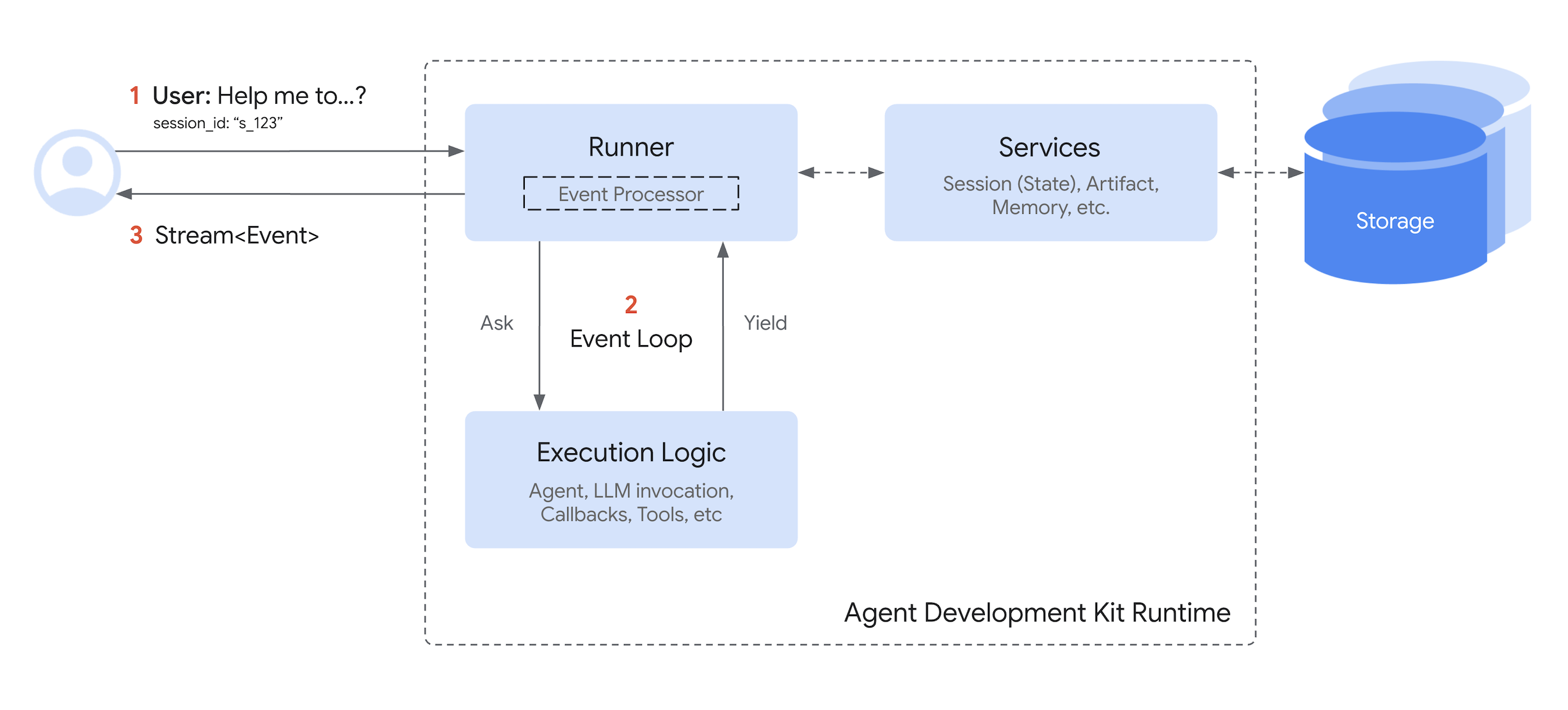
以下是 Session 和 SessionService 在对话轮次中如何协同工作的简化流程:
- 开始或恢复: 你的应用需要使用
SessionService 来
进行 create_session(用于新聊天)或使用现有的会话 ID。 - 提供上下文:
Runner 从
适当的服务方法获取相应的 Session 对象,为 Agent 提供访问
相应会话的 state 和 events 的权限。 - Agent 处理: 用户向 Agent 提出查询。Agent 分析查询,也可能分析会话
state 和 events 历史,以确定响应。 - 响应与状态更新: Agent 生成响应(并可能
标记要在
state 中更新的数据)。Runner 将其打包为 Event。 - 保存互动:
Runner 调用
sessionService.append_event(session, event),将 session 和新的
event 作为参数。服务将 Event 添加到历史记录中,并基于事件中的信息更新会话的 state。会话的 last_update_time 也会被更新。 - 准备下一轮: Agent 的响应发送给用户。更新后的
Session 现在由 SessionService 存储,为下一轮准备
(该循环从步骤1重新开始,通常继续当前会话中的对话)。 - 结束对话: 当对话结束时,你的应用调用
sessionService.delete_session(...) 以清理存储的会话数据,如果不再需要。
此循环突出了 SessionService 如何通过管理每个 Session 对象相关的历史和状态来确保对话的连续性。
使用 SessionService 管理会话 link
如上所示,你通常不会直接创建或管理 Session 对象。
相反,你使用一个 SessionService。该服务作为中央管理器,负责你的对话会话的整个生命周期。
其核心职责包括:* 开始新对话: 当用户开始交互时创建新的 Session 对象。
- 继续现有对话: 检索特定的
Session(使用其 ID),以便 Agent 可以从上次中断的地方继续。 - 保存进度: 将新的交互(
Event 对象)附加到会话历史中。这也是会话 state 更新的机制(更多内容见 State 部分)。 - 列出对话: 查找特定用户和应用程序的活动会话线程。
- 清理: 在对话结束或不再需要时删除
Session 对象及其相关数据。
SessionService 实现 link
ADK 提供了不同的 SessionService 实现,允许您选择最适合您需求的存储后端:
InMemorySessionService link
- 工作原理: 将所有会话数据直接存储在应用程序的内存中。
- 持久性: 无。如果应用程序重启,所有会话数据将丢失。
- 所需: 无额外要求。
- 最适合: 快速开发、本地测试、示例以及不需要长期持久性的场景。
py
2 行
展开
收起
expand_more
from google.adk.sessions import InMemorySessionService
session_service = InMemorySessionService()
go
2 行
展开
收起
expand_more
import "google.golang.org/adk/v2/session"
inMemoryService := session.InMemoryService()
VertexAiSessionService link
支持版本:Python v0.1.0, Go v0.1.0。
- 工作原理: 通过 API 调用使用 Google Cloud Agent 平台基础设施进行会话管理。
- 持久性: 是的。数据通过 Agent Runtime(https://example.com) 可靠且可扩展地管理。
- 要求:
- 适用场景: 部署在 Google Cloud 的可扩展生产应用程序,尤其是在与其他 Agent Platform 功能集成时。
py
12 行
展开
收起
expand_more
# 要求:pip 安装 google-adk[gcp]
# 另外需要设置和认证 GCP
from google.adk.sessions import VertexAiSessionService

PROJECT_ID = "your-gcp-project-id"
LOCATION = "us-central1"
# 使用此服务的 app_name 应该是推理引擎 ID 或名称
REASONING_ENGINE_APP_NAME = "projects/your-gcp-project-id/locations/us-central1/reasoningEngines/your-engine-id"

session_service = VertexAiSessionService(project=PROJECT_ID, location=LOCATION)
# 调用服务方法时使用 REASONING_ENGINE_APP_NAME,例如:
# session = await session_service.create_session(app_name=REASONING_ENGINE_APP_NAME, ...)
go
15 行
展开
收起
expand_more
import "google.golang.org/adk/v2/session"

// 2. VertexAI服务
// 在运行之前,请确保您的环境已认证:
// gcloud auth application-default login
// export GOOGLE_CLOUD_PROJECT="your-gcp-project-id"
// export GOOGLE_CLOUD_LOCATION="your-gcp-location"

modelName := "gemini-flash-latest" // Replace with your desired model
vertexService, err := session.VertexAIService(ctx, modelName)
if err != nil {
  log.Printf("Could not initialize VertexAIService (this is expected if the gcloud project is not set): %v", err)
} else {
  fmt.Println("Successfully initialized VertexAIService.")
}
有关从 ADK Agent 连接到 Google Cloud 的更多信息,请参阅
连接到 Google Cloud 和 Agent 平台。
DatabaseSessionService link
支持版本:Python v0.1.0, Go v0.1.0。
- 工作原理: 连接到关系型数据库(例如 PostgreSQL、MySQL、
SQLite)以在表中持久存储会话数据。
- 持久性: 是的。数据在应用重启后仍然存在。
- 要求: 已配置的数据库。在 Python 中,还需要
db 额外组件,
可通过 pip install google-adk[db] 安装。在 Go 中,需要对应数据库的
GORM 驱动]。 - 适用场景: 需要可靠持久存储并由您自己管理的应用。
py
6 行
展开
收起
expand_more
from google.adk.sessions import DatabaseSessionService
# 使用本地 SQLite 文件的示例:
# 注意:实现需要异步数据库驱动。
# 对于 SQLite,请使用 'sqlite aiosqlite' 而不是 'sqlite' 来确保异步兼容性。
db_url = "sqlite+aiosqlite:///./my_agent_data.db"
session_service = DatabaseSessionService(db_url=db_url)
go
19 行
展开
收起
expand_more
import (
    "log"
    "github.com/glebarez/sqlite"
    "gorm.io/gorm"

    "google.golang.org/adk/v2/session/database"
)

// 使用本地 SQLite 文件的示例。任何 GORM 方言都可以使用,因为
// PostgreSQL 的示例 gorm.io/driver/postgres。
sessionService, err := database.NewSessionService(sqlite.Open("my_agent_data.db"), &gorm.Config{})
if err != nil {
    log.Fatal(err)
}
// 创建表格并添加较新 ADK 版本所需的任何列。
// 每次应用程序启动时都运行它。
if err := database.AutoMigrate(sessionService); err != nil {
    log.Fatal(err)
}
warning
在每次启动时运行 AutoMigrate
Go 会话服务不会创建或更新其表。每次应用启动时,在处理流量之前调用 database.AutoMigrate。它会创建缺失的表和列,并且不会删除现有的表,因此在 ADK 升级添加列后,数据库仍然可以继续工作。它还可以更改现有列的类型以符合 ADK 的预期。如果您自己管理模式而不是运行 AutoMigrate,请在部署引入新列的 ADK 版本之前添加新列。否则,对该表的写入将失败。
DatabaseSessionService 通过双层锁定架构确保在并发操作中的数据完整性:
- 进程内锁定: 服务使用内部进程内锁来序列化针对同一会话的
append_event 调用。这防止了当多个请求在同一进程中同时尝试更新同一会话时发生的竞态条件。 - 行级锁定: 对于 PostgreSQL、MySQL 和 MariaDB,服务使用行级锁定(通过
SELECT ... FOR UPDATE)来防止当多个进程或副本同时尝试更新同一会话时发生的竞态条件。
warning
异步驱动要求
DatabaseSessionService 需要异步数据库驱动。在使用 SQLite 时,必须在连接字符串中使用 sqlite+aiosqlite 代替 sqlite。对于其他数据库(PostgreSQL、MySQL),请确保使用异步兼容驱动,例如 PostgreSQL 的 asyncpg,MySQL 的 aiomysql。
在执行过程中,ADK 可能会抛出特定异常,以帮助您识别配置或状态问题。
SessionNotFoundError link
当执行器试图访问或执行在活动会话存储中不存在的会话时会抛出该异常。为了向后兼容,它继承自 ValueError。
- 常见原因: 无效、过期或缺失的
session_id;在会话创建之前运行会话。 - 解决方法: 先通过
create_session(...) 确保会话存在,或者使用 auto_create_session=True 构造 Runner。
原文:Session: Tracking individual conversations · 固定源版本