多工具 Agent
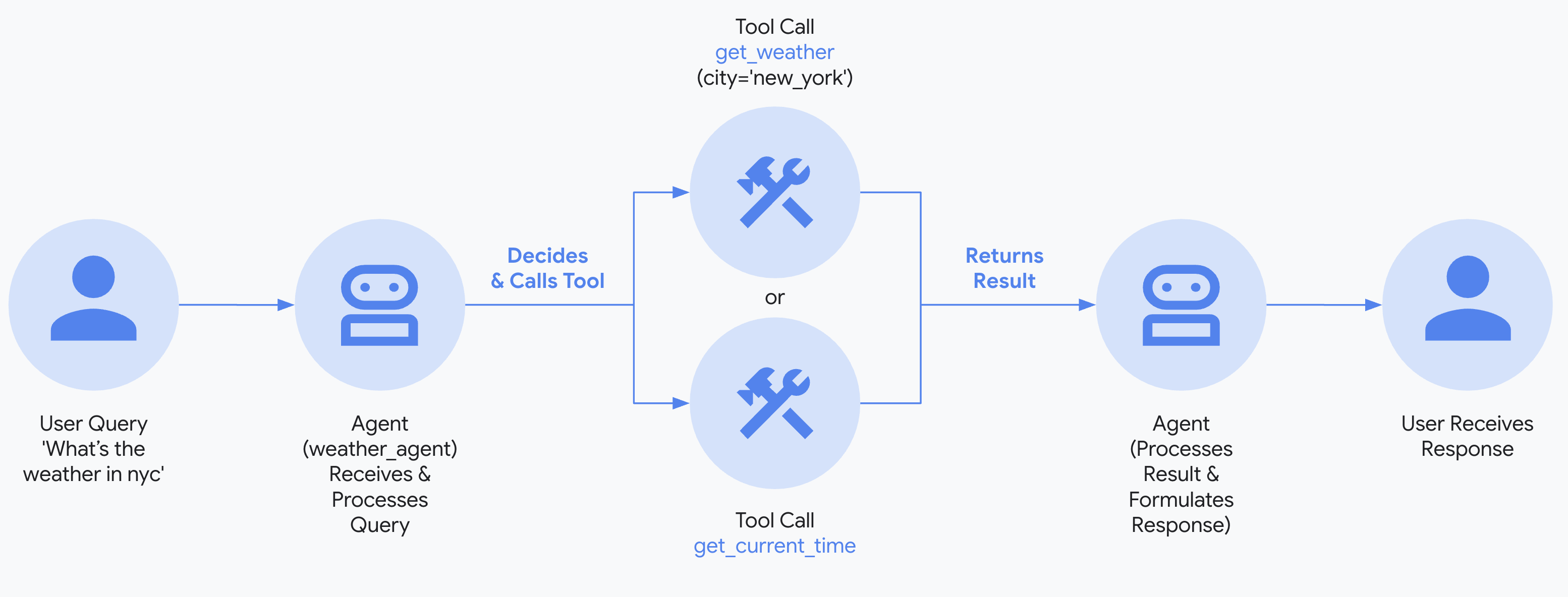
本快速入门指南将引导您安装 Agent Development Kit(ADK)、设置一个具有多种工具的基本 Agent,并在本地运行它,无论是在终端中还是在交互式浏览器开发界面中。
支持版本:Python v0.1.0, Go v0.1.0。
本快速入门指南将引导您安装 Agent Development Kit(ADK), 设置一个具有多种工具的基础 Agent,并在本地运行它, 可在终端中或在交互式的浏览器开发界面中运行。
本快速入门假设您有一个本地 IDE(VS Code, PyCharm, IntelliJ IDEA 等), 并且安装了 Python 3.10 或 Java 17,并且可以访问终端。该方法将在 您的电脑上完全运行应用程序,推荐用于内部开发。
1. 设置环境并安装 ADK link
创建并激活虚拟环境(推荐):
bash 6 行 展开 收起 expand_more
# Create
python3 -m venv .venv
# Activate (each new terminal)
# macOS/Linux: source .venv/bin/activate
# Windows CMD: .venv\Scripts\activate.bat
# Windows PowerShell: .venv\Scripts\Activate.ps1安装 ADK:
bash 1 行 展开 收起 expand_more
pip install google-adk2. 创建 Agent 项目 link
项目结构 link
您需要创建以下项目结构:
console 5 行 展开 收起 expand_more
parent_folder/
multi_tool_agent/
__init__.py
agent.py
.env
创建文件夹 multi_tool_agent:
bash 1 行 展开 收起 expand_more
mkdir multi_tool_agent/Windows 用户注意事项
在 Windows 上使用 ADK 执行接下来的步骤时,我们建议使用文件资源管理器或 IDE 创建 Python 文件,因为以下命令(mkdir, echo)通常会生成包含空字节和/或编码不正确的文件。
__init__.py link
现在在文件夹中创建一个 __init__.py 文件:
shell 1 行 展开 收起 expand_more
echo "from . import agent" > multi_tool_agent/__init__.py你的 __init__.py 现在应该看起来像这样:
python 1 行 展开 收起 expand_more
from . import agentagent.py link
在同一文件夹中创建一个 agent.py 文件:
macOS / Linux
shell 1 行 展开 收起 expand_more
touch multi_tool_agent/agent.pyWindows
shell 1 行 展开 收起 expand_more
type nul > multi_tool_agent/agent.py将以下代码复制并粘贴到 agent.py 中:
python 79 行 展开 收起 expand_more
# Copyright 2026 Google LLC
#
# Licensed under the Apache License, Version 2.0 (the "License");
# 除非遵守许可协议,否则您不得使用此文件。
# 您可以在以下位置获取许可副本
#
# http://www.apache.org/licenses/LICENSE-2.0
#
# 除非适用法律要求或书面约定,否则根据许可协议分发的软件
# 按“原样”提供
# WITHOUT WARRANTIES OR CONDITIONS OF ANY KIND, either express or implied.
# 请参阅许可协议以了解管理权限和
# limitations under the License.
import datetime
from zoneinfo import ZoneInfo
from google.adk.agents import Agent
def get_weather(city: str) -> dict:
"""Retrieves the current weather report for a specified city.
Args:
city (str): The name of the city for which to retrieve the weather report.
Returns:
dict: status and result or error msg.
"""
if city.lower() == "new york":
return {
"status": "success",
"report": (
"The weather in New York is sunny with a temperature of 25 degrees"
" Celsius (77 degrees Fahrenheit)."
),
}
else:
return {
"status": "error",
"error_message": f"Weather information for '{city}' is not available.",
}
def get_current_time(city: str) -> dict:
"""Returns the current time in a specified city.
Args:
city (str): The name of the city for which to retrieve the current time.
Returns:
dict: status and result or error msg.
"""
if city.lower() == "new york":
tz_identifier = "America/New_York"
else:
return {
"status": "error",
"error_message": (
f"Sorry, I don't have timezone information for {city}."
),
}
tz = ZoneInfo(tz_identifier)
now = datetime.datetime.now(tz)
report = (
f'The current time in {city} is {now.strftime("%Y-%m-%d %H:%M:%S %Z%z")}'
)
return {"status": "success", "report": report}
root_agent = Agent(
name="weather_time_agent",
model="gemini-flash-latest",
description=(
"Agent to answer questions about the time and weather in a city."
),
instruction=(
"You are a helpful agent who can answer user questions about the time and weather in a city."
),
tools=[get_weather, get_current_time],
).env link
在同一文件夹中创建一个 .env 文件:
macOS / Linux
shell 1 行 展开 收起 expand_more
touch multi_tool_agent/.envWindows
shell 1 行 展开 收起 expand_more
type nul > multi_tool_agent\.env有关此文件的更多说明在下一部分关于设置模型中描述。
你需要创建以下项目结构:
console 4 行 展开 收起 expand_more
my-adk-agent/
agent.go
.env
go.mod
agent.go link
在你的项目文件夹中创建一个 agent.go 文件:
macOS / Linux
bash 1 行 展开 收起 expand_more
touch agent.goWindows
console 1 行 展开 收起 expand_more
type nul > agent.go
将以下代码复制并粘贴到 agent.go 中:
go 116 行 展开 收起 expand_more
package main
import (
"context"
"log"
"os"
"strings"
"time"
"google.golang.org/genai"
"google.golang.org/adk/v2/agent"
"google.golang.org/adk/v2/agent/llmagent"
"google.golang.org/adk/v2/cmd/launcher"
"google.golang.org/adk/v2/cmd/launcher/full"
"google.golang.org/adk/v2/model/gemini"
"google.golang.org/adk/v2/tool"
"google.golang.org/adk/v2/tool/functiontool"
)
type CityArgs struct {
City string `json:"city"`
}
func main() {
ctx := context.Background()
// 1. 设置模型。
// 注意:认证通过 GOOGLE_API_KEY 环境变量处理。
model, err := gemini.NewModel(ctx, "gemini-flash-latest", &genai.ClientConfig{
APIKey: os.Getenv("GOOGLE_API_KEY"),
})
if err != nil {
log.Fatalf("Failed to create model: %v", err)
}
weatherTool, err := functiontool.New[CityArgs, map[string]any](
functiontool.Config{
Name: "get_weather",
Description: "Retrieves the current weather report for a specified city.",
},
func(ctx agent.Context, args CityArgs) (map[string]any, error) {
if strings.EqualFold(args.City, "new york") {
return map[string]any{
"status": "success",
"report": "The weather in New York is sunny with a temperature of 25 degrees Celsius (77 degrees Fahrenheit).",
}, nil
}
return map[string]any{
"status": "error",
"error_message": "Weather information for '" + args.City + "' is not available.",
}, nil
},
)
if err != nil {
log.Fatalf("Failed to create get_weather tool: %v", err)
}
currentTimeTool, err := functiontool.New[CityArgs, map[string]any](
functiontool.Config{
Name: "get_current_time",
Description: "Returns the current time in a specified city.",
},
func(ctx agent.Context, args CityArgs) (map[string]any, error) {
var tzIdentifier string
if strings.EqualFold(args.City, "new york") {
tzIdentifier = "America/New_York"
} else {
return map[string]any{
"status": "error",
"error_message": "Sorry, I don't have timezone information for " + args.City + ".",
}, nil
}
tz, err := time.LoadLocation(tzIdentifier)
if err != nil {
return nil, err
}
now := time.Now().In(tz)
report := "The current time in " + args.City + " is " + now.Format("2006-01-02 15:04:05 MST-0700")
return map[string]any{
"status": "success",
"report": report,
}, nil
},
)
if err != nil {
log.Fatalf("Failed to create get_current_time tool: %v", err)
}
// 2. 定义 Agent。
a, err := llmagent.New(llmagent.Config{
Name: "weather_time_agent",
Model: model,
Description: "Agent to answer questions about the time and weather in a city.",
Instruction: "You are a helpful agent who can answer user questions about the time and weather in a city.",
Tools: []tool.Tool{
weatherTool,
currentTimeTool,
},
})
if err != nil {
log.Fatalf("Failed to create agent: %v", err)
}
// 3. 配置启动器并运行。
config := &launcher.Config{
AgentLoader: agent.NewSingleLoader(a),
}
l := full.NewLauncher()
if err = l.Execute(ctx, config, os.Args[1:]); err != nil {
log.Fatalf("Run failed: %v\n\n%s", err, l.CommandLineSyntax())
}
}.env link
在同一文件夹中创建一个 .env 文件:
macOS / Linux
bash 1 行 展开 收起 expand_more
touch .envWindows
console 1 行 展开 收起 expand_more
type nul > .env

3. 设置模型 link
您的 Agent 理解用户请求并生成响应的能力依赖于生成型 AI 模型或大型语言模型 (LLM)。本指南使用 Gemini 模型作为示例,但 ADK 兼容 Google 和其他提供商的多种 AI 模型。有关可用模型及其配置方法的详细信息,请参见 ADK Agent 的 AI 模型。
模型连接和认证 link
通过服务使用 AI 模型时,例如 Gemini API 或 Google Cloud 上的 Gemini 企业 Agent 平台,您必须提供 API 密钥或通过服务进行认证。提供此信息最直接的方法是使用环境变量或 .env 文件。以下示例显示了配置 Agent 以使用 Gemini API 或 Gemini 企业 Agent 平台的最常用方法。
text 2 行 展开 收起 expand_more
# .env configuration file
GOOGLE_API_KEY="PASTE_YOUR_GEMINI_API_KEY_HERE"text 4 行 展开 收起 expand_more
# .env configuration file
GOOGLE_CLOUD_PROJECT=your-project-id
GOOGLE_CLOUD_LOCATION=location-code # example: us-central1
GOOGLE_GENAI_USE_ENTERPRISE=True4. 运行您的 Agent link
使用终端,导航到您的 Agent 项目的父目录
(例如使用 cd ..):
console 5 行 展开 收起 expand_more
parent_folder/ <-- navigate to this directory
multi_tool_agent/
__init__.py
agent.py
.env
与您的 Agent 进行交互有多种方式:
开发者界面(adk web)
Agent 平台用户的身份验证设置
如果您在上一步选择了**“Gemini - Google 云 Agent 平台”**,则必须在启动开发者 UI 之前使用 Google 云进行身份验证。
运行此命令并按照提示操作:
bash 1 行 展开 收起 expand_more
gcloud auth application-default login注意: 如果你使用的是“Gemini - Google AI Studio”,请跳过此步骤。
shell 1 行 展开 收起 expand_more
adk web注意:ADK Web仅供开发使用
ADK Web 不用于生产部署。您应仅将 ADK Web用于开发和调试目的。
Windows 用户注意
在访问 _make_subprocess_transport NotImplementedError 时,请考虑改用 adk web --no-reload。
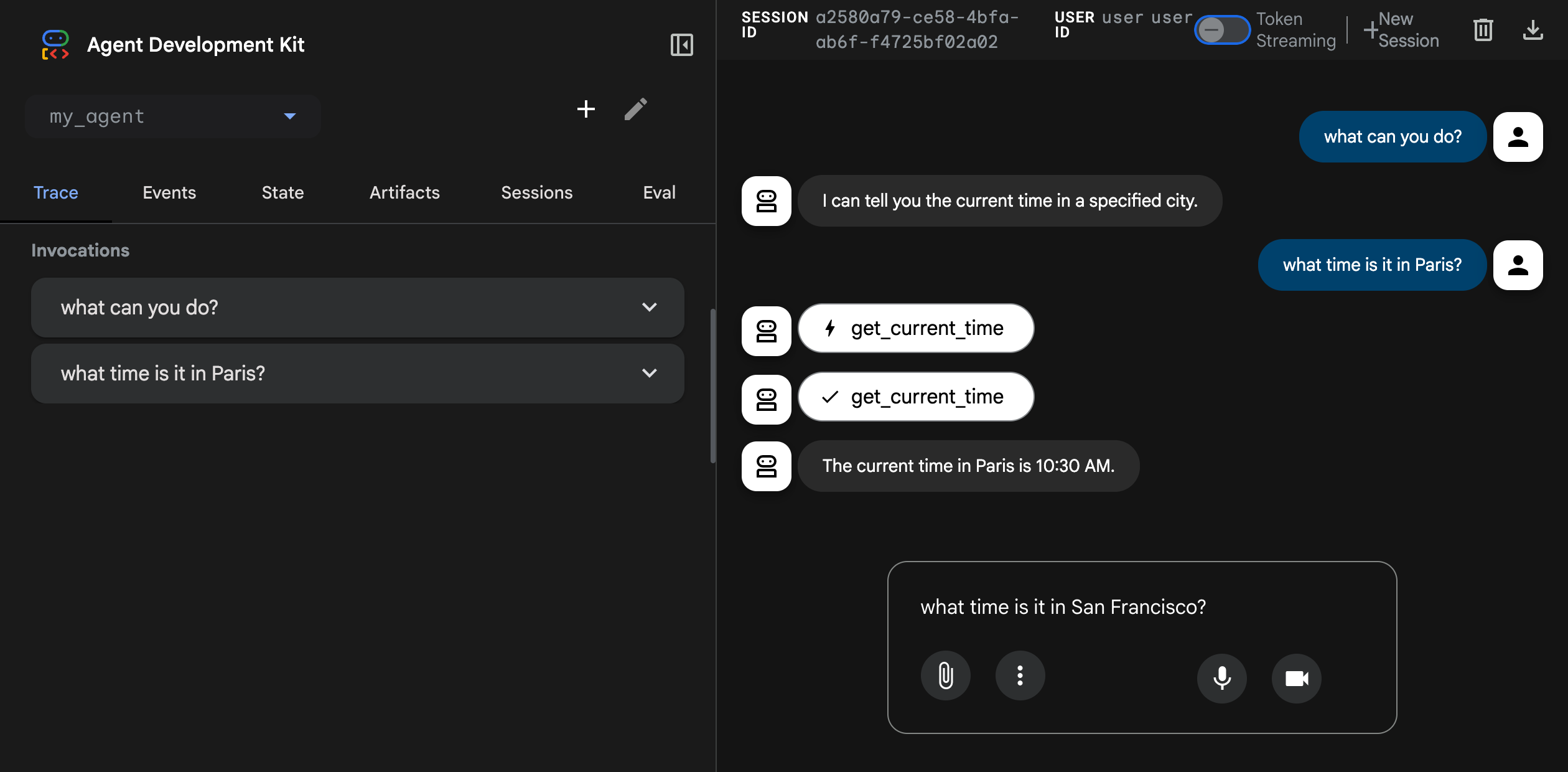
步骤 2: 在界面左上角的下拉菜单中选择您的 Agent。选择 “multi_tool_agent”。
故障排除
如果在下拉菜单中看不到 “multi_tool_agent”,请确保您在 Agent 文件夹的父文件夹中运行 adk web(即 multi_tool_agent 的父文件夹)。

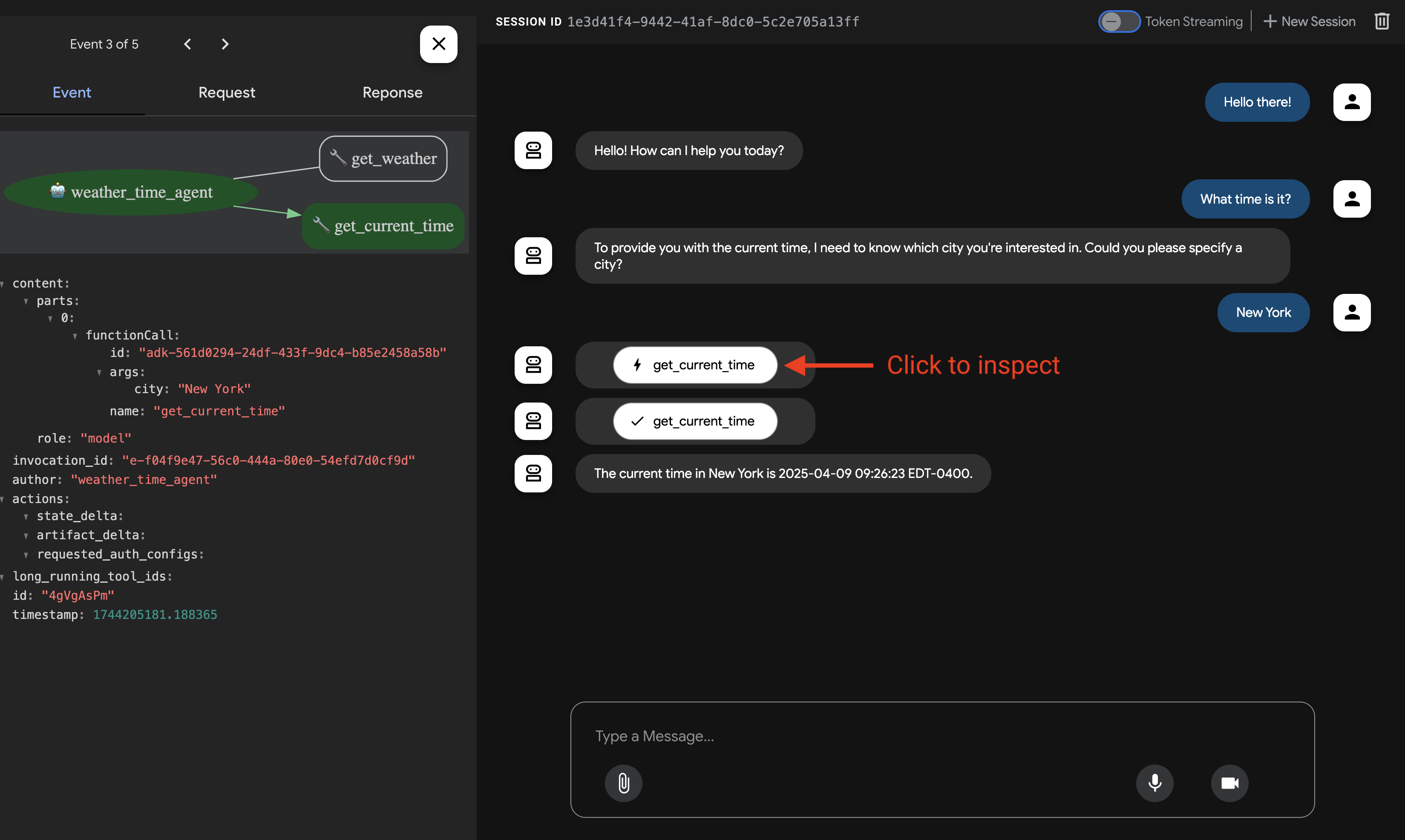
步骤 4: 使用左侧的 Events 标签,可以通过点击操作来检查各个函数调用、响应和模型响应:

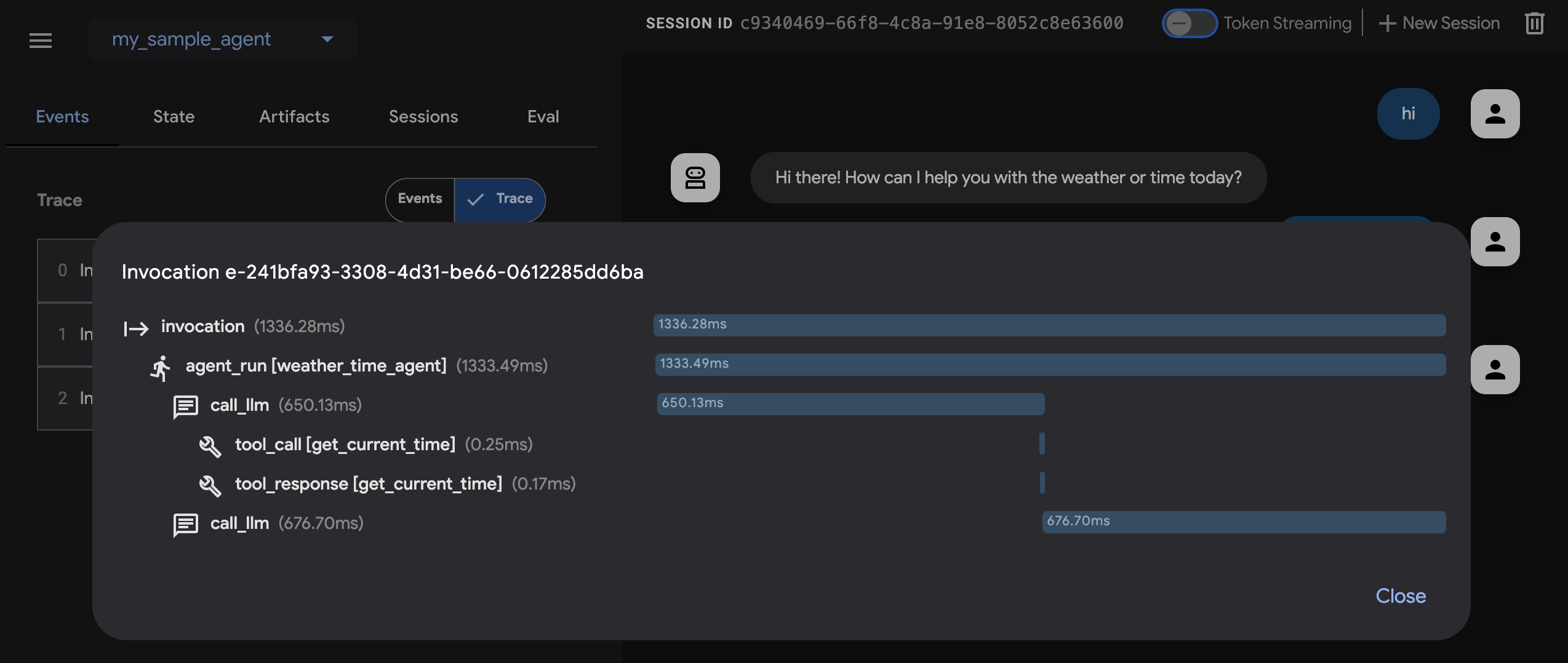
在 Events 标签中,您还可以点击 Trace 按钮查看每个事件的追踪日志,显示每次函数调用的延迟:

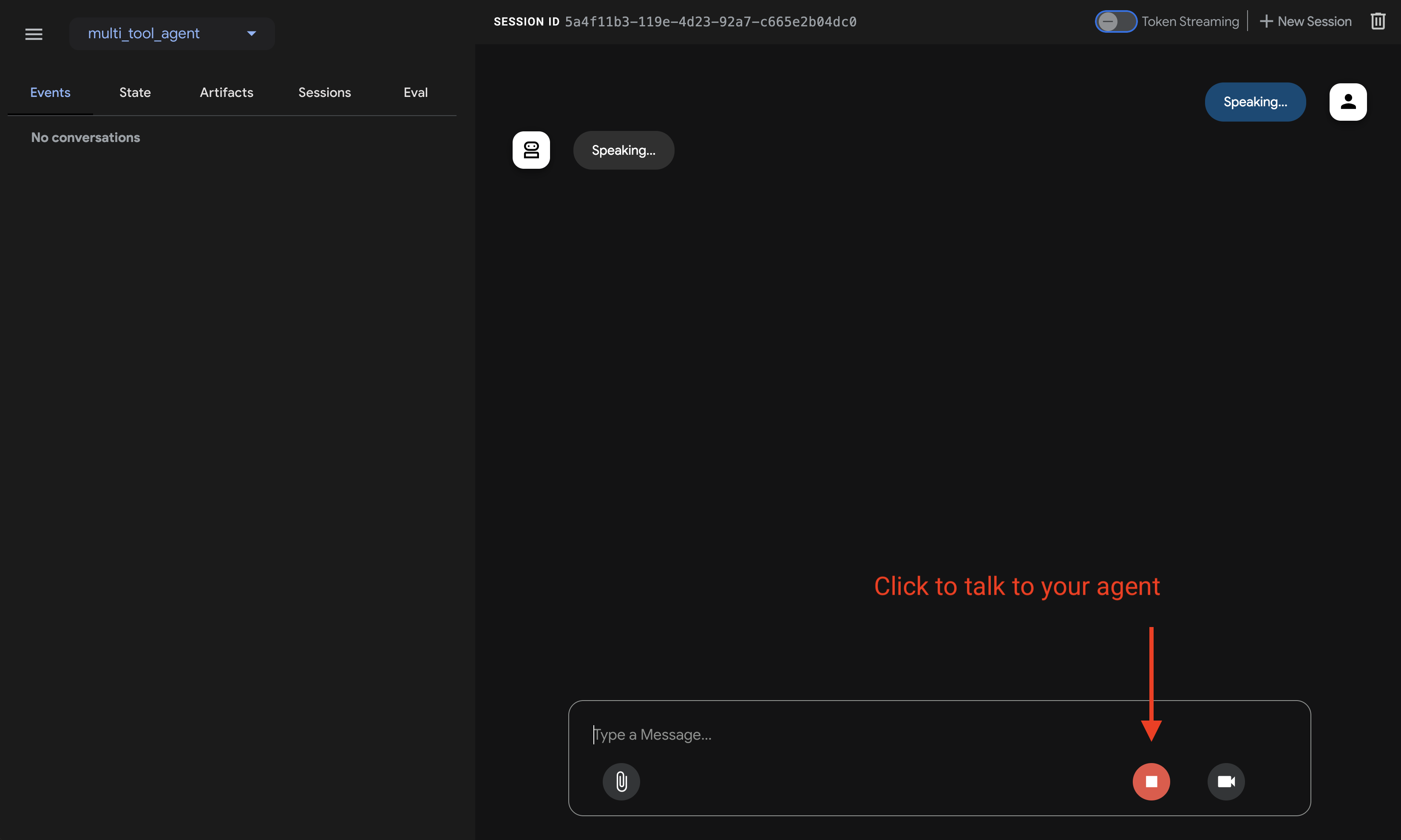
步骤 5: 您还可以启用麦克风与 Agent 对话:
语音/视频流模型支持
要在 ADK 中使用语音/视频流功能,您需要使用支持 Live API 的 Gemini 模型。您可以在文档中找到支持 Gemini Live API 的 模型 ID:
然后,您可以在之前创建的 agent.py 文件中用 model 替换 root_agent 中的字符串(跳转到章节 )。您的代码应类似于:
py 4 行 展开 收起 expand_more
root_agent = Agent(
name="weather_time_agent",
model="replace-me-with-model-id", #e.g. gemini-live-2.5-flash-native-audio
...
终端(adk run)
使用 adk run 时,你可以将提示注入到 Agent 中开始,
方法是将文本通过命令传递,如下所示:
shell 1 行 展开 收起 expand_more
echo "Please start by listing files" | adk run multi_tool_agenttext 1 行 展开 收起 expand_more
adk run multi_tool_agent
要退出,请使用 Cmd/Ctrl C。
API 服务器(adk api_server)
adk api_server 使您能够通过单个命令创建本地 FastAPI 服务器,从而在部署 Agent 之前测试本地 cURL 请求。

有关如何使用 adk api_server 进行测试的详细信息,请参考使用 API 服务器的文档。
使用终端,导航到您的 Agent 项目目录:
console 4 行 展开 收起 expand_more
my-adk-agent/ <-- navigate to this directory
agent.go
.env
go.mod
与您的 Agent 互动有多种方式:
开发者界面(web)
运行以下命令以启动 开发者界面(dev UI)。您必须指定要激活的子启动器(例如,webui、api)。
bash 1 行 展开 收起 expand_more
go run agent.go web webui api步骤 1: 在浏览器中直接打开提供的 URL(通常为 http://localhost:8080)。
步骤 2: 在界面左上角的下拉菜单中选择你的 Agent,应为 “weather_time_agent”。
步骤 3: 现在你可以使用文本框与 Agent 进行聊天。
终端(console)
在终端中运行以下命令以与 Agent 聊天。
bash 1 行 展开 收起 expand_more
go run agent.go console注意: 如果 console 是你代码中的第一个子启动器(就像 full.NewLauncher() 那样),你也可以直接运行 go run agent.go。
要退出,请使用 Cmd/Ctrl C。
📝 可尝试的示例提示 link
- 纽约的天气如何?
- 纽约的时间是多少?
- 巴黎的天气如何?
- 巴黎的时间是多少?
🎉 恭喜! link
你已成功使用 ADK 创建并与第一个 Agent 互动!
🛣️ 下一步 link
- 前往教程:学习如何为你的 Agent 添加记忆、会话和状态: tutorial。
- 深入高级配置: 探索 setup 部分,更深入了解项目结构、配置及其他界面。
- 理解核心概念: 学习有关 agents concepts。
原文:Build a multi-tool agent · 固定源版本
最后更新 2026-11-12 23:26 . history